Resend alternative for developers
A factual Resend alternative comparison for developers: API coverage, observability, data location, SDK capabilities, and migration steps.
Resend gained traction by marketing itself as the developer-friendly email service. It offers a clean API, a modern dashboard, and TypeScript support. For many developers, it was a meaningful step forward from legacy providers like SendGrid and Mailgun.
But as teams scale their email infrastructure, they run into limitations. This post examines the specific areas where developers find Resend falls short, and how Nuntly addresses those gaps. The goal is not to dismiss Resend, but to give you the information you need to make a clear-eyed decision.
API coverage
Resend covers sending, domains, and API keys, and you can now list previously sent emails through the API too. The gaps left are narrower than they used to be: batch sending is still send-only (no endpoint to check a batch's status after you fire it), and there's no endpoint for aggregated delivery stats, only individual API request logs.
Nuntly exposes every platform feature through its REST API: domains, API keys, webhooks with per-event delivery logs and replay, bulk sends with a status-check endpoint, and an aggregated stats endpoint for delivery numbers over a period. Every endpoint is documented with an OpenAPI specification, and the SDK is generated from that spec, so types and methods stay in sync with the API automatically.
This matters in practice when you need to check on a bulk send after the fact, wire delivery stats into your own dashboards, or fold email management into CI/CD pipelines.
Observability
When an email fails to reach a recipient, you need to understand why. Resend's API gives you per-email status and API request logs, but nothing for aggregated delivery, bounce, or complaint rates: you read logs one email at a time or check the dashboard.
Nuntly puts sending, receiving, API requests, webhook deliveries, and event history in one observability dashboard instead of splitting them across separate views:
- Delivery rate, bounce rate, and complaint rate tracked over 30 days
- Visual email flow diagrams showing the path from send to delivery, bounce, or complaint
- Bounce breakdowns by type (permanent, transient) and reason
- API request logs, webhook delivery attempts, and event history in the same dashboard
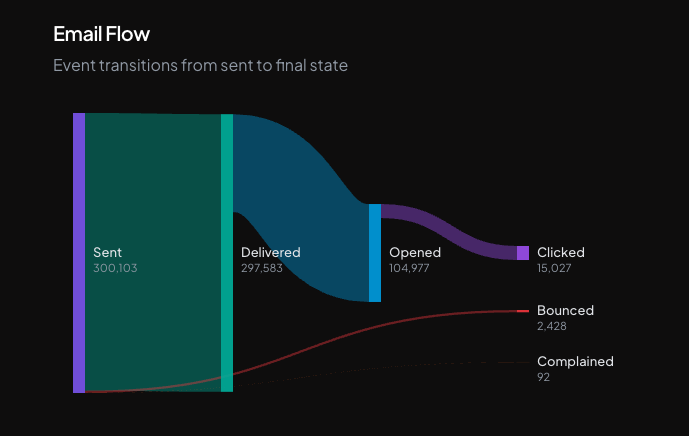
The dashboard flags your complaint rate once it crosses 0.08%. Cross a stricter 0.05% and Nuntly's abuse detection pauses the sending domain automatically. That protects your sender reputation before mailbox providers act on it themselves.
Data location
If your application serves European users, you likely have data residency requirements under GDPR or your own internal policies. Resend lets you pick an EU sending region (Ireland), but that only controls where messages are routed from. Resend's own documentation states that it stores account data, email metadata, logs, and API records in the United States regardless of the sending region you select.
Nuntly provides EU data hosting as the default on every plan. Your email content, logs, events, and analytics stay within the EU, not just the sending path. See the EU data residency comparison for the full breakdown of what each provider stores where, and Resend EU alternatives if EU storage is a hard requirement.
For teams that operate globally, having control over where your email data resides is a practical requirement, not a theoretical concern.
SDK capabilities
Both Resend and Nuntly offer TypeScript SDKs. The differences are in depth and flexibility.
Error handling
Resend never throws for a failed send. Every call returns a { data, error, headers } tuple, and error carries a flat message, statusCode, and error code string. There is no way to opt into exceptions.
Nuntly supports the same pattern: use the safe client and every call returns a { data, error } tuple instead of throwing.
import { APIError, createSafeNuntly } from '@nuntly/sdk';const nuntly = createSafeNuntly({ apiKey: process.env.NUNTLY_API_KEY });const { data, error } = await nuntly.emails.send({from: 'alerts@yourapp.com',to: 'user@example.com',subject: 'Security alert',html: '<p>A new device signed in to your account.</p>',});if (error) {if (error instanceof APIError) {logger.error('Email failed', { status: error.status, code: error.code });} else {logger.error('Email failed', { message: error.message });}return;}logger.info('Email sent', { emailId: data.id });
If you're more comfortable with exceptions, Nuntly's default client throws typed errors instead: APIError and subclasses like NotFoundError, RateLimitError, and AuthenticationError, each carrying status, code, title, details, requestId, and the raw Response object.
import { APIError, RateLimitError } from '@nuntly/sdk';try {await nuntly.emails.send({from: 'alerts@yourapp.com',to: 'user@example.com',subject: 'Security alert',html: '<p>A new device signed in to your account.</p>',});} catch (error) {if (error instanceof RateLimitError) {logger.error('Rate limited', { retryAfter: error.retryAfter });} else if (error instanceof APIError) {logger.error('Email failed', { status: error.status, code: error.code });}}
Resend has no equivalent: error-as-value is its only mode.
Pagination
When you need to iterate through large datasets, like listing all emails or webhook events, Nuntly provides built-in auto-pagination:
for await (const email of nuntly.emails.list()) {console.log(email.id, email.status);}
Resend does not provide auto-pagination in its SDK. You handle cursors and page management manually.
Advanced configuration
Nuntly supports per-request overrides for timeouts and retries, custom fetch implementations for proxy and edge environments, and structured logging integration. These features are important in production but not available in the Resend SDK.
Raw response access
Sometimes you need to inspect HTTP headers for rate-limiting information or request IDs. Resend returns a parsed headers record alongside data and error on every call, but not the raw Response object. Nuntly's .withResponse() returns both the parsed data and the underlying Response, and .asResponse() returns the raw Response as soon as headers arrive, before the body is consumed, useful for streaming or header-only checks.
For a full SDK comparison, see the SDK feature page.
Webhook capabilities
Both platforms support webhooks for email events. The differences matter as your event volume grows.
Nuntly provides event replay, which lets you re-deliver a specific webhook event to your endpoint. This is useful when your handler has a bug and you need to reprocess events after deploying a fix. Resend does not offer event replay at the time of writing.
Nuntly also provides webhook delivery logs with full request and response details for each attempt, making it straightforward to debug failed deliveries. See the webhooks feature page for the complete set of capabilities.
Runtime support
The Nuntly SDK works across Node.js, Bun, Deno, Cloudflare Workers, and Vercel Edge Runtime. Resend also supports multiple runtimes, including edge environments. Both platforms handle this well.
Pricing
Resend's Free plan caps at 3,000 emails per month with a 100/day limit. Pro starts at $20/month for 50,000 emails, and Scale runs from $90/month at 100,000 emails up to $1,150/month at 2.5 million, past which you're quoted Enterprise pricing.
Nuntly matches the same free tier (3,000 emails/month, 100/day cap), then costs less at every paid tier: €16/month for 50,000 emails, €28 or €68/month for 100,000 depending on plan, and €492/month at 1 million emails against Resend's $650. See every volume tier on the Resend pricing comparison.
Migration from Resend
If you decide to switch, the migration process is straightforward:
- Create a Nuntly account and generate an API key.
- Add and verify your sending domain. Nuntly generates the DNS records you need and verifies them automatically.
- Install the SDK:
npm install @nuntly/sdk - Update your send calls. The API shape is similar. Here is a before and after:
// Before: Resendimport { Resend } from 'resend';const resend = new Resend(process.env.RESEND_API_KEY);await resend.emails.send({from: 'hello@yourapp.com',to: 'user@example.com',subject: 'Welcome',html: '<p>Welcome to our platform.</p>',});// After: Nuntlyimport { Nuntly } from '@nuntly/sdk';const nuntly = new Nuntly();await nuntly.emails.send({from: 'hello@yourapp.com',to: 'user@example.com',subject: 'Welcome',html: '<p>Welcome to our platform.</p>',});
- Reconfigure webhooks to point to the Nuntly webhook delivery system.
- Run both providers in parallel for a transition period. Send a percentage of traffic through Nuntly to validate delivery rates before fully switching over.
For a detailed feature-by-feature comparison, see the Nuntly vs Resend page.
When Resend might be the right choice
Resend is a reasonable choice if you send low volumes of email, do not need EU data hosting, and do not require full API coverage for automation. Its dashboard is clean, the basic API works, and getting started is fast.
The limitations become apparent when you need production-grade observability, comprehensive API access, event replay for webhooks, or data residency controls. That is when developers start evaluating alternatives.
Summary
The decision to switch email providers is not one to take lightly. It involves DNS changes and, as the last migration step above notes, running both providers in parallel for a while to check delivery rates before cutting over fully. The code change itself is small: .emails.send() takes the same arguments, so switching is mostly a matter of swapping the SDK import and client setup. If you are running into the gaps described here, the migration is straightforward and the long-term benefits are concrete: full API coverage, a unified observability dashboard, EU data hosting, and a more capable SDK.
Ship emails, not infrastructure
Free plan available. No credit card required.
Start sending free